Goals
- Scan our PLC to see what we can learn
- Attack the different protocols exposed by the PLC
I’ll note at the start, we won’t cover every aspect of attacking an S7-1200. I’m ignoring SNMP entirely, as well as exploits against the device itself, for the following reasons:
- I didn’t want to have to downgrade/upgrade the PLC firmware to get to vulnerable versions
- I didn’t find the SNMP risks that interesting
- I wanted to focus on the ‘flashier’ attacks instead
I do intend to do a much more indepth analysis at some point, looking at past CVEs and more technical attacks
The techniques discussed in this article should only be conducted against systems you personally own or have explicit permission to test against.
Scanning
What is network scanning without Nmap? Let’s look at a few different scans we can run, and the result we get back.
Basic Scan
The most basic scan we can perform. Note the use of the -Pn flag to skip discovery, because I’ve already discovered the assets using my eyes.
nmap -Pn 10.0.0.10
Nmap scan report for 10.0.0.10
Host is up (0.014s latency).
Not shown: 998 closed tcp ports (conn-refused)
PORT    STATE SERVICE
80/tcp  open  http
443/tcp open  https

Nmap done: 1 IP address (1 host up) scanned in 14.64 seconds
It gives us HTTP/HTTPS and nothing else. So we’ll have to dig deeper.
Port Scan
Throwing on the -p 0-65535 flag will give us a full, and much, much slower, scan on the PLC.
nmap -Pn 10.0.0.10 -p 0-65535
Starting Nmap 7.97 ( https://nmap.org ) at 2026-07-23 11:38 +0100
Host is up (0.014s latency).
Not shown: 65530 closed tcp ports (conn-refused)
PORT     STATE    SERVICE
0/tcp    filtered unknown
80/tcp   open     http
102/tcp  open     iso-tsap
443/tcp  open     https
502/tcp  open     mbap
4840/tcp open     opcua-tcp

Nmap done: 1 IP address (1 host up) scanned in 712.71 seconds
That’s better. Now we’re getting what we expect.
Service Scan
Now we’ll try and get some more details on the services. I’ve filtered the ports based on the last scan for the sake of time.
nmap -Pn -sV 10.0.0.10 -p 80,102,443,502,4840
Starting Nmap 7.97 ( https://nmap.org ) at 2026-07-23 11:52 +0100
Nmap scan report for 10.0.0.10
Host is up (0.022s latency).
PORT     STATE SERVICE    VERSION
80/tcp   open  http
102/tcp  open  iso-tsap   Siemens S7 PLC
443/tcp  open  https?
502/tcp  open  mbap?
4840/tcp open  opcua-tcp?
1 service unrecognized despite returning data. If you know the service/version, please submit the following fingerprint at https://nmap.org/cgi-bin/submit.cgi?new-service :
SF-Port80-TCP:V=7.97%I=7%D=7/23%Time=6A61F270%P=arm-apple-darwin23.6.0%r(G
SF:etRequest,52,"HTTP/1\.0\x20400\r\ncontent-type:\x20text/html\r\ncontent
SF:-length:\x203\r\nconnection:\x20close\r\n\r\n400")%r(HTTPOptions,52,"HT
SF:TP/1\.0\x20400\r\ncontent-type:\x20text/html\r\ncontent-length:\x203\r\
SF:nconnection:\x20close\r\n\r\n400")%r(FourOhFourRequest,52,"HTTP/1\.0\x2
SF:0400\r\ncontent-type:\x20text/html\r\ncontent-length:\x203\r\nconnectio
SF:n:\x20close\r\n\r\n400");
Service Info: Device: specialized

Service detection performed. Please report any incorrect results at https://nmap.org/submit/ .
Nmap done: 1 IP address (1 host up) scanned in 166.22 seconds
We got a little extra information on port 102, and not much else.
Script Scans
Time to crack out the scripts. We’ll start with S7 Info and see what we get.
nmap -Pn 10.0.0.10 --script s7-info.nse -p 102
Starting Nmap 7.97 ( https://nmap.org ) at 2026-07-23 11:57 +0100
Nmap scan report for 10.0.0.10
Host is up (0.014s latency).

PORT    STATE SERVICE
102/tcp open  iso-tsap
| s7-info:
|   Module: 6ES7 212-1AE40-0XB0
|   Basic Hardware: 6ES7 212-1AE40-0XB0
|_  Version: 4.5.1
Service Info: Device: specialized

Nmap done: 1 IP address (1 host up) scanned in 31.03 seconds
A hardware and firmware number is a good result. The firmware version could be used to begin to identify what exploits might work against the device.
We’ll try Modbus Discovery next.
nmap -Pn 10.0.0.10 --script modbus-discover.nse --script-args='modbus-discover.aggressive=true' -p 502
Starting Nmap 7.97 ( https://nmap.org ) at 2026-07-23 11:58 +0100
Nmap scan report for 10.0.0.10
Host is up (0.014s latency).

PORT    STATE SERVICE
502/tcp open  modbus
| modbus-discover:
|   sid 0x1:
|     error: ILLEGAL FUNCTION
|   sid 0x1b:
|     error: ILLEGAL FUNCTION
|   sid 0x33:
|     error: ILLEGAL FUNCTION
|   sid 0x4b:
|     error: ILLEGAL FUNCTION
|   sid 0x67:
|     error: ILLEGAL FUNCTION
|   sid 0x7d:
|     error: ILLEGAL FUNCTION
|   sid 0x93:
|     error: ILLEGAL FUNCTION
|   sid 0xa9:
|     error: ILLEGAL FUNCTION
|   sid 0xc1:
|     error: ILLEGAL FUNCTION
|   sid 0xdc:
|     error: ILLEGAL FUNCTION
|   sid 0xf3:
|_    error: ILLEGAL FUNCTION

Nmap done: 1 IP address (1 host up) scanned in 10.08 seconds
Not much of anything…
Let’s try Profinet CM Lookup.
sudo nmap -Pn -sU 10.0.0.10 -p 34964 --script profinet-cm-lookup
Starting Nmap 7.97 ( https://nmap.org ) at 2026-07-23 11:59 +0100
Nmap scan report for 10.0.0.10
Host is up.

PORT      STATE SERVICE
34964/udp open  profinet-cm
| profinet-cm-lookup:
|   ipAddress: 10.0.0.10
|   annotationOffset: 0
|   annotationLength: 64
|_  annotation: S7-1200                   6ES7 212-1AE40-0XB0     14 V  4  5  1\x00

Nmap done: 1 IP address (1 host up) scanned in 2.68 seconds
Nothing new there.
And Multicast Profinet Discovery?
nmap -Pn -sV --script=multicast-profinet-discovery 10.0.0.10
Starting Nmap 7.97 ( https://nmap.org ) at 2026-07-23 12:00 +0100
Nmap scan report for 10.0.0.10
Host is up (0.013s latency).
Not shown: 998 closed tcp ports (conn-refused)
PORT    STATE SERVICE VERSION
80/tcp  open  http
| fingerprint-strings:
|   FourOhFourRequest, GetRequest, HTTPOptions:
|     HTTP/1.0 400
|     content-type: text/html
|     content-length: 3
|_    connection: close
443/tcp open  https?
1 service unrecognized despite returning data. If you know the service/version, please submit the following fingerprint at https://nmap.org/cgi-bin/submit.cgi?new-service :
SF-Port80-TCP:V=7.97%I=7%D=7/23%Time=6A61F47E%P=arm-apple-darwin23.6.0%r(G
SF:etRequest,52,"HTTP/1\.0\x20400\r\ncontent-type:\x20text/html\r\ncontent
SF:-length:\x203\r\nconnection:\x20close\r\n\r\n400")%r(HTTPOptions,52,"HT
SF:TP/1\.0\x20400\r\ncontent-type:\x20text/html\r\ncontent-length:\x203\r\
SF:nconnection:\x20close\r\n\r\n400")%r(FourOhFourRequest,52,"HTTP/1\.0\x2
SF:0400\r\ncontent-type:\x20text/html\r\ncontent-length:\x203\r\nconnectio
SF:n:\x20close\r\n\r\n400");

Service detection performed. Please report any incorrect results at https://nmap.org/submit/ .
Nmap done: 1 IP address (1 host up) scanned in 184.99 seconds
Not much of any use to us.
Attacks
HTTP
Lets check out the web service running on the PLC. I’ve configured it to be as insecure as possible.
When we first access the webpage, we land on the ‘Start Page’ where we are immediately tempted by the big ‘STOP’ button. And if we click it…
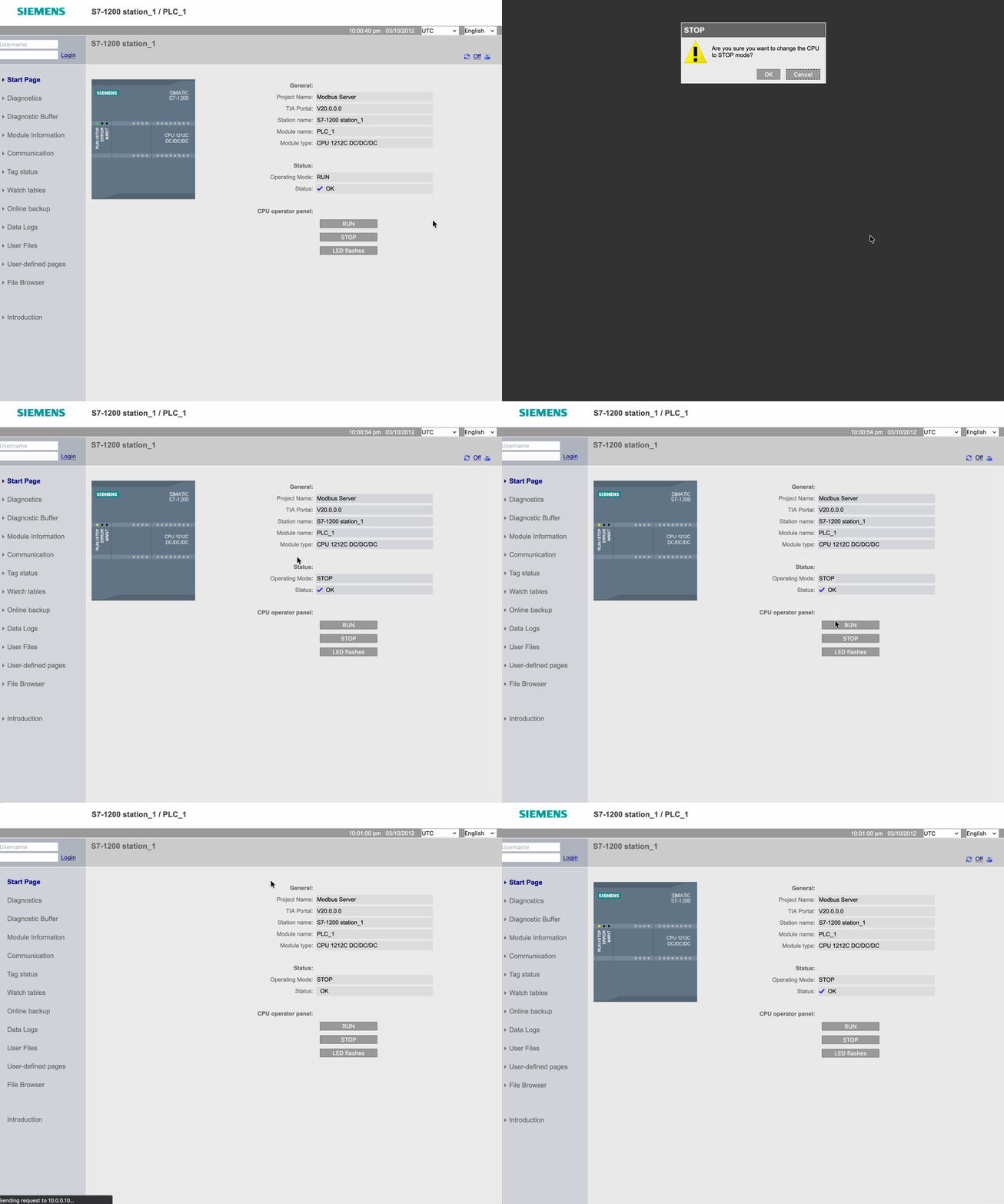
Easy as that - I even scripted it with a bit of python!

We can also snoop around the webpage to do some data gathering while we’re here. We can find out:
- Serial Number
- Hardware Version
- Firmware Version
- Diagnostics Information
- Network Interface Details
- Any Uploaded Files (including recipes)
- and so much more!
Now it’s time to make an over-the-top article online about how insecure PLCs are and how hackers are going to hack them all and blow up every factory and destroy the world!!!!!!!!!!!
But lets put it in context:
- Web access can be disabled, and often times is.
- Even if it’s enabled, it is often behind credential based access.
- Even if the access is open, it often isn’t exposed to the internet.
Now of course, there are instances where it all goes wrong, but with a few good security controls, this type of risk can be reduced.
S7comm
We can take advantage of the S7comm protocol to manipulate the digital outputs at will. Using this script, we can simply decide which outputs we want on and off, and run it.

However, a caveat. For the above demo, I put a blank project onto the PLC - removing all the ladder logic I’d be using before. I did this because, when my ladder logic was loaded, this attack didn’t actually work. This is because the ladder logic instantly overwrote the adhoc input, nullifying the attack.
This is a good point to remind you that articles like this, and many, many others, do not always reflect the reality of risk on site. Yes, OT sites are filled with unpatched devices, ancient operating systems, and bad network segmentation, but they are also extremely complex in their own right, with things like ladder logic and safety systems that are not understood at all by folk in IT, or more traditional cyber security. Therefore, don’t always let yourself be taken in by flashy attacks like the above. Just because something looks crazy in a video, doesn’t mean it would have the same impact in the real world.
OPC-UA
We dove deeper into OPC-UA in a previous article where we looked at how bad authentication practice could lead to tags being written to by strangers. Check if out here to see more.
Claroty actually have a really good deep dive into OPC-UA security that I’d suggest you check out it you want to dive deeper.
Modbus
Plain old TCP Modbus is about as insecure as you can get. Within the Modbus Protocol specification, there is no:
- Authentication
- Authorisation
- Encryption
- Integrity Checks
- Replay Protection
This makes Modbus quite a vulnerable protocol to run in your environment. This risk is naturally reduced due to defence in depth - with modbus traffic not usually coming past Purdue level 2, but if an attacker got that deep into your environment (or came in through the backdoor!) they can have a lot of fun playing with Modbus.
We could try a few different attacks here, but I want to focus on a MITM tampering attack. It’s a slightly complex attack, so I’ll be dedicating a whole article to it. We’ll also look at a tool I made to help pull it off.
Final Thoughts
We’ve taken a brief look at a few different attack vectors that an S7-1200 can expose. One thing worth noting is that, as mentioned at the top of the page, we didn’t actually exploit any CVEs, or technical vulnerabilities. All these attacks were possible because of misconfigurations made on the device. Misconfigurations that made the device much easier to set up and manage, but left it wide open to abuse. Everything we took advantage of worked exactly as it should have, it just shouldn’t have been available to us. This emphasises the importance of a) proper network segmentation and b) device hardening to decrease the attack surface. This is what we’ll look at next in the defend portion.