- Goals
- Why Secure your OPC-UA Server
- OPC-UA Server Security Controls
- Scanning OPC-UA Servers
- Final Thoughts
I’ve put the tool on Github - give it a star if you like it :)
Goals
- Understand the security controls commonly found on an OPC-UA server
- Understand the pros and cons of said security controls and why you would or wouldn’t want to use them
- Understand how a lack of security controls can lead to major vulnerabilities in the system
Why Secure your OPC-UA Server
Your OPC-UA server is full of data, assigned to different tags. You want to be able to control who or what can access those tags to read (or even write) to them. You also want to be able to dictate the security of the connection between clients and servers to prevent eavesdropping or man-in-the-middle attacks.
OPC-UA Server Security Controls
Nearly all OPC-UA servers will present the same, common security controls. The ones I will focus on here are:
- Security Policies
- Security Mode
- User Authentication
If you’ve worked with other systems before, none of these will come as a surprise but it is worth taking some time to understand them in an OT context to ensure we know the tools we have at our disposal.
Security Policies
Security Policies are how servers tell clients which cryptographic algorithms it can support for encryption, signing, and hashing. The client can pick from these to initiate its secure (or in some cases, not secure) connection to the server.
The below table gives a helpful overview:
| Policy Name | Encryption | Signature / Hash | Key Wrap | Deprecated? |
|---|---|---|---|---|
| None | None | None | None | No* |
| Basic128Rsa15 | AES-128 (CBC) | SHA-1 | RSA PKCS#1 v1.5 | Yes (since v1.04 - SHA-1 + weak RSA padding) |
| Basic256 | AES-256 (CBC) | SHA-1 | RSA-OAEP | Yes (since v1.04 - SHA-1) |
| Basic256Sha256 | AES-256 (CBC) | SHA-256 | RSA-OAEP | No |
| Aes128Sha256RsaOaep | AES-128 (CBC) | SHA-256 | RSA-OAEP | No |
| Aes256Sha256RsaPss | AES-256 (CBC) | SHA-256 | RSA-PSS | No |
*it’s not deprecated, but it also offer you 0 security
As a rule of thumb: disable None, Basic128Rsa15 and Basic256, and only allow the three SHA-256 policies.
Security Mode
If Security Policy defines what should be applied to the connection, the Security Mode defines how it should be done. There are 3 different security modes that can be chosen from.
- None - No security is applied to the communication - nothing is signed or encrypted.
- Sign - Messages are signed but are not encrypted.
- SignAndEncrypt - Messages are both encrypted and signed.
None should only be used for testing or debugging.
You could get away with Sign if your data is not confidential (which this type of data often isn’t really that confidential, however your tag names might be a give away, so on second thought, encrypt if you can!!). This gives you the ability to still sniff the traffic for debugging purposes but adds a much needed layer of integrity between client and server, reducing the risk of packets being tampered with.
Of course, Sign and Encrypt is the best, and should be used in production where possible. It keeps your traffic private and integral, and will impress your auditors! However, this adds the need to manage certificates for your OPC-UA server which is an added layer of complexity. An added layer of complexity that is worth dealing with to reduce the risk, but nonetheless, it’s added.
User Authentication
You don’t want just anyone logging into your OPC-UA server and looking at (or writing to!) your tags. These controls allow you to set up user accounts, or at least create some layer of trust, to facilitate the connection between a client and server.
Guest / Anonymous
Well, this one doesn’t achieve much. Leaving Guest or Anonymous access on allows anyone to connect to your OPC-UA server. There are some scenarios where this might be desired, but 99/100 times you will not want any of your OPC-UA endpoints to support this.
Username and Password
As it says on the tin. A username and password can be supplied by the client to authenticate the session. Depending on the OPC-UA server itself, this method will differ in terms of management and customisation, but it’s often a great starting point to bolster security.
Certificates (X509)
More so used to authenticate between systems than users, certificates are another supported method for authentication.
SSO
Some more modern OPC-UA servers will even offer SSO options via things like Kerberos or OAuth. This makes user management far easier, bringing it in line with other modern systems. Of course, in the world of OT, your mileage may vary as to whether or not you have systems like that in your OT networks.
Scanning OPC-UA Servers
As mentioned above, when you first connect to an OPC-UA server, it will advertise what security controls it supports. This means we can write a little tool to scan OPC-UA servers and gather information on how secure (or not!) they are.
This led me to create OPC-UA Recon (with a little help from Claude, of course!).
With this tool, we can do the following:
- Quickly scan an OPC-UA server for endpoints and see what levels of security are offered
- Check if anonymous access works
- Test if credentials work
- Search for writeable tags, either anonymously or with credentials
- Output our results to CSV.
Basic Recon Scan
We can run a basic scan against the OPC-UA server running on the S7-1200 and see what we get back:

opcua-recon -ip "10.0.0.10"
Target:  opc.tcp://10.0.0.10:4840
=== opc.tcp://10.0.0.10:4840 ===
3 endpoint(s)

[Endpoint 1]
  URL:             opc.tcp://10.0.0.10:4840
  Security mode:   MessageSecurityModeNone
  Security policy: http://opcfoundation.org/UA/SecurityPolicy#None
  Security level:  0
  Allows Anonymous Login:  true
  Allows Credential Login:  true
  Supported Login Methods:  [Anonymous (guest) Username/Password]
***
[+] Anonymous Access Available
[+] Credential Access Available
[Endpoint 2]
  URL:             opc.tcp://10.0.0.10:4840
  Security mode:   MessageSecurityModeSign
  Security policy: http://opcfoundation.org/UA/SecurityPolicy#Basic256Sha256
  Security level:  65
  Allows Anonymous Login:  true
  Allows Credential Login:  true
  Supported Login Methods:  [Anonymous (guest) Username/Password]
***
[+] Anonymous Access Available
[+] Credential Access Available
[Endpoint 3]
  URL:             opc.tcp://10.0.0.10:4840
  Security mode:   MessageSecurityModeSignAndEncrypt
  Security policy: http://opcfoundation.org/UA/SecurityPolicy#Basic256Sha256
  Security level:  115
  Allows Anonymous Login:  true
  Allows Credential Login:  true
  Supported Login Methods:  [Anonymous (guest) Username/Password]
***
[+] Anonymous Access Available
[+] Credential Access Available
---
The PLC is actually offering Basic256Sha256 with Sign and SignAndEncrypt - the crypto on offer is perfectly fine. But that doesn’t stop us being able to walk through the None door and abuse the anonymous access there. A secure endpoint does you no good if you leave an insecure one running alongside it for anyone to pick instead.
Test Anonymous Access
You can see we found 3 endpoints, one for each of the supported security modes and security policy combinations. We can also see they all support Anonymous and Credential based access. Let’s see if that anonymous access works for endpoint 1.
opcua-recon -ip 10.0.0.10 -security-mode none -probe-anon
Target:  opc.tcp://10.0.0.10:4840
=== opc.tcp://10.0.0.10:4840 ===
3 endpoint(s)

[Endpoint 1]
  URL:             opc.tcp://10.0.0.10:4840
  Security mode:   MessageSecurityModeNone
  Security policy: http://opcfoundation.org/UA/SecurityPolicy#None
  Security level:  0
  Allows Anonymous Login:  true
  Allows Credential Login:  true
  Supported Login Methods:  [Anonymous (guest) Username/Password]
***
[+] Anonymous Access Available
[+] Credential Access Available
[*] Checking if Anonymous access works...
[+] anonymous login SUCCEEDED
---
Search for Writeable Tags
Looks like we have anonymous access. I wonder if there are any tags we have write access to…
opcua-recon -ip 10.0.0.10 -security-mode none -probe-anon -probe-write
Target:  opc.tcp://10.0.0.10:4840
=== opc.tcp://10.0.0.10:4840 ===
3 endpoint(s)

[Endpoint 1]
  URL:             opc.tcp://10.0.0.10:4840
  Security mode:   MessageSecurityModeNone
  Security policy: http://opcfoundation.org/UA/SecurityPolicy#None
  Security level:  0
  Allows Anonymous Login:  true
  Allows Credential Login:  true
  Supported Login Methods:  [Anonymous (guest) Username/Password]
***
[+] Anonymous Access Available
[+] Credential Access Available
[*] Checking if Anonymous access works...
[+] anonymous login SUCCEEDED
[*] Attempting to find writeable tags on opc.tcp://10.0.0.10:4840 with Anonymous credentials
[+] Found writeable tag: Registers (ns=4;i=13)
[+] Found writeable tag: [0] (ns=4;i=14)
[+] Found writeable tag: [1] (ns=4;i=15)
[+] Found writeable tag: [2] (ns=4;i=16)
[+] Found writeable tag: [3] (ns=4;i=17)
[+] Found writeable tag: [4] (ns=4;i=18)
[+] Found writeable tag: [5] (ns=4;i=19)
[+] Found writeable tag: [6] (ns=4;i=20)
...
[+] Found writeable tag: [97] (ns=4;i=111)
[+] Found writeable tag: [98] (ns=4;i=112)
[+] Found writeable tag: [99] (ns=4;i=113)
[+] Found writeable tag: Fan_On (ns=4;i=125)
[+] Found writeable tag: Green_LED_On (ns=4;i=126)
[+] Found writeable tag: Red_LED_On (ns=4;i=127)
[+] 104 writeable tags found
It’s a long list, but the most interesting tags are at the bottom. Those are the ones we use to control the PLC via our HMI. It looks like we have write access to all the tags over an anonymous session - this is terrible security!
Writing to a Tag
Lets take it one step further and see if we can really write to these tags. I’ll use the opcua-commander client to try and write to the tag.
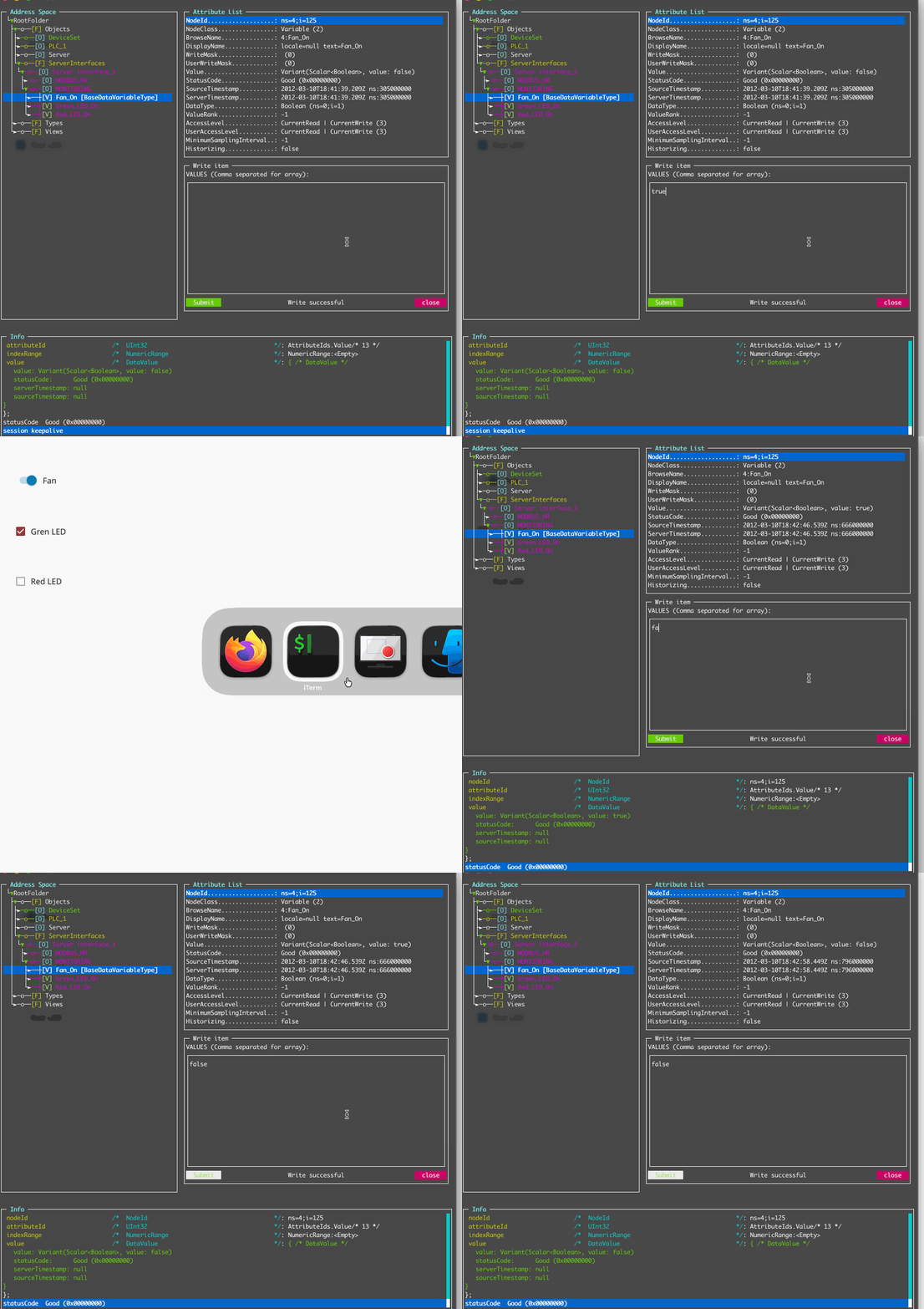
There we have it - we successfully found and wrote to an OPC-UA tag with zero authentication.
Final Thoughts
In this article we’ve looked at some of the security controls available for protecting OPC-UA servers, and how neglecting them can make it trivially easy for unwanted guests to tamper with tag values. Of course, defence in depth is a concept that shouldn’t be ignored in the real world, where we wouldn’t be reliant on only the controls offered by a specific system, but we shouldn’t neglect to harden all systems where possible. You never know when a lazy vendor will accidentally expose your OPC-UA server to the internet!